Early Bird tickets for Obsession 2026 are now open. Get your 50% off
Login
✦ New · Standalone product

One template. Live data. A polished document for every customer.

Base Documents connects to your CRM and data stack, designs the pages for you, and generates personalized QBRs, EBRs, value snapshots and renewal docs, each one built from that customer's own data. No slide editors, no stale screenshots, no design-team queue. Designer-grade output without the designer.

The problem

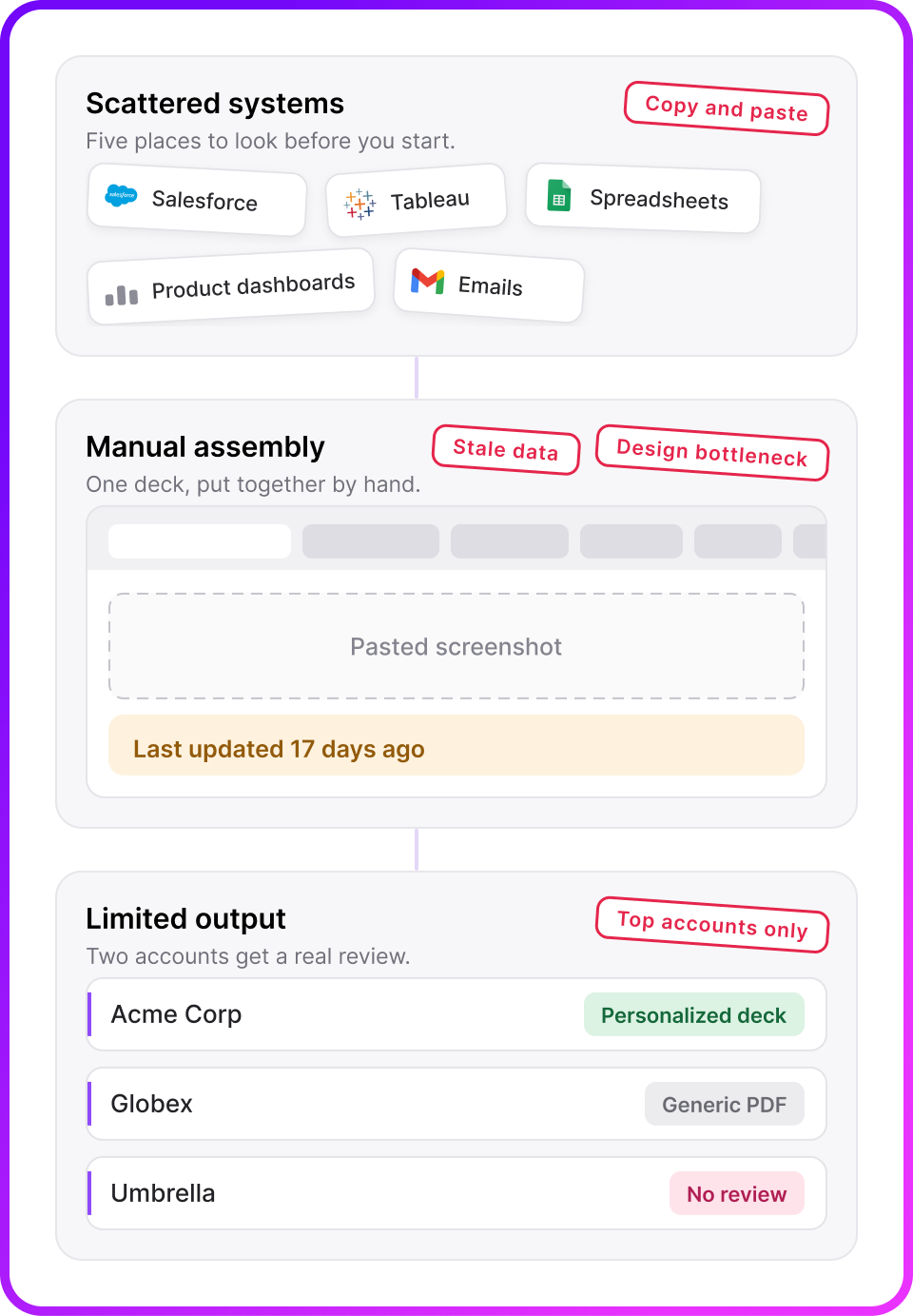
QBR week is arts & crafts week.

Every quarter, the team screenshots dashboards, pastes them into slides, and hand-types numbers that are stale before the meeting starts. Multiply by every account in the book.

Hours per account

Each review deck is rebuilt by hand: copy the template, swap the logo, chase the data, fix the layout. Again next quarter.

Stale the moment it ships

Numbers are exported once and frozen in a slide. By meeting day, the story they tell is already out of date.

Only the top accounts get one

There's never time to cover the whole book. Long-tail customers get a generic PDF, or nothing at all.

Polished or fast, pick one

DIY slides look homemade; routing through the design team turns every deck into a two-week project.

Hours per deck · every account · every quarter
The product

Base Documents: documents, generated from live data.

ConnectDesignAssembleGenerateDeliver

One master template. Renders with each customer's own data, criteria applied.

No design skills needed. Pages are designed by conversation with Studio AI.

Always current. Data is fetched at generation time, never pasted.

Standalone product. Buy it on its own; it fits the stack you already run.

How it works

Six steps from raw data to a document in their inbox.

  1. 1

    Connect, securely

    Salesforce, HubSpot, Snowflake, BigQuery, Redshift, Tableau. Scoped, read-only. Accounts sync in automatically.

  2. 2

    Design by conversation

    Describe a page and Studio AI designs it. Then redesign by chat: "make it bolder", "add a renewal countdown".

  3. 3

    Assemble Documents

    Stack published components into QBRs, EBRs, onboarding decks and renewal docs. One master, every account.

  4. 4

    Set criteria per page

    Visibility rules on account fields decide what each customer sees. Non-matching pages are silently dropped.

  5. 5

    Generate per account

    Ad-hoc, in batches, or by journey. Independent exports, live statuses, stored history on every account.

  6. 6

    Deliver

    Download instantly, email to customers, hand to CSMs, attach in your CRM, or drop into your shared drive.

1 Connect

Plug in your tools, data sources and CRM, securely.

  • CRM. Salesforce or HubSpot; your accounts sync in read-only and stay in sync.

  • Warehouse & BI. Snowflake, BigQuery, Redshift, Tableau for usage and value metrics.

  • Scoped access. You decide which objects and fields Documents can see; nothing else.

  • One data layer. CRM, warehouse and usage data resolve to a single view per customer.

2 Design

Don't be a designer. Describe it.

Tell Studio AI what the page should say. It designs an on-brand, print-ready component in seconds, and every number on it is bound to a real data field, not typed in. Then keep talking: every message is a redesign. When it's right, publish it and it becomes a building block for every document.

  • One-line prompt to a finished page. The AI knows your brand, formats and fields.

  • Iterate by chat. Layout, colors, charts, new elements; no tools to learn.

  • Versioned. Every iteration is a version; publish the one you love.

  • Two formats. 16:9 slide pages or Letter document pages.

3 Assemble

Snap pages together into Documents.

Stack your published components into a document, one component per page, full-bleed. Build it once, and it becomes the master for every customer.

  • Page strip builder. Add, reorder, duplicate, preview live.

  • Data pages. Each account's live records: filter, sort, top-10 cap or split across pages.

QBRsEBRsValue snapshotsOnboarding decksRenewal docs
4 Criteria

Decide the criteria for every page, per customer.

Every page carries its own visibility rules on account fields. Each customer's document keeps only the pages they match. No manual editing, no "N/A" slides.

  • "Shown to: only matching accounts." Field-based rules on any page.

  • Silently dropped. Non-matching pages don't exist in that customer's PDF.

  • Preview as any account. See exactly which pages each customer gets.

5 Generate

Pick the accounts. Get the PDFs.

Each selected account gets its own personalized PDF with its data filled in. Exports run independently with live statuses; every finished PDF is stored on the account.

  • Preview as account first. The exact resolved document, before anything ships.

  • Independent exports. One account's hiccup never blocks the rest.

  • Stored history. Re-download any PDF from the account's row, anytime.

6 Automate & deliver

One journey. Your entire segment.

A journey turns generation from a task into a policy: the segment decides who, the trigger decides when, and every qualifying account gets its own personalized PDF, then it's sent on. 5 accounts or 500. Update the template once and the next run follows it, automatically, without you touching it.

Ad-hoc

One account, one PDF, in moments.

Batch

A set of accounts before QBR week.

Journey

A segment on a schedule, forever.

Beyond reporting

Documents that don't just report. They recommend.

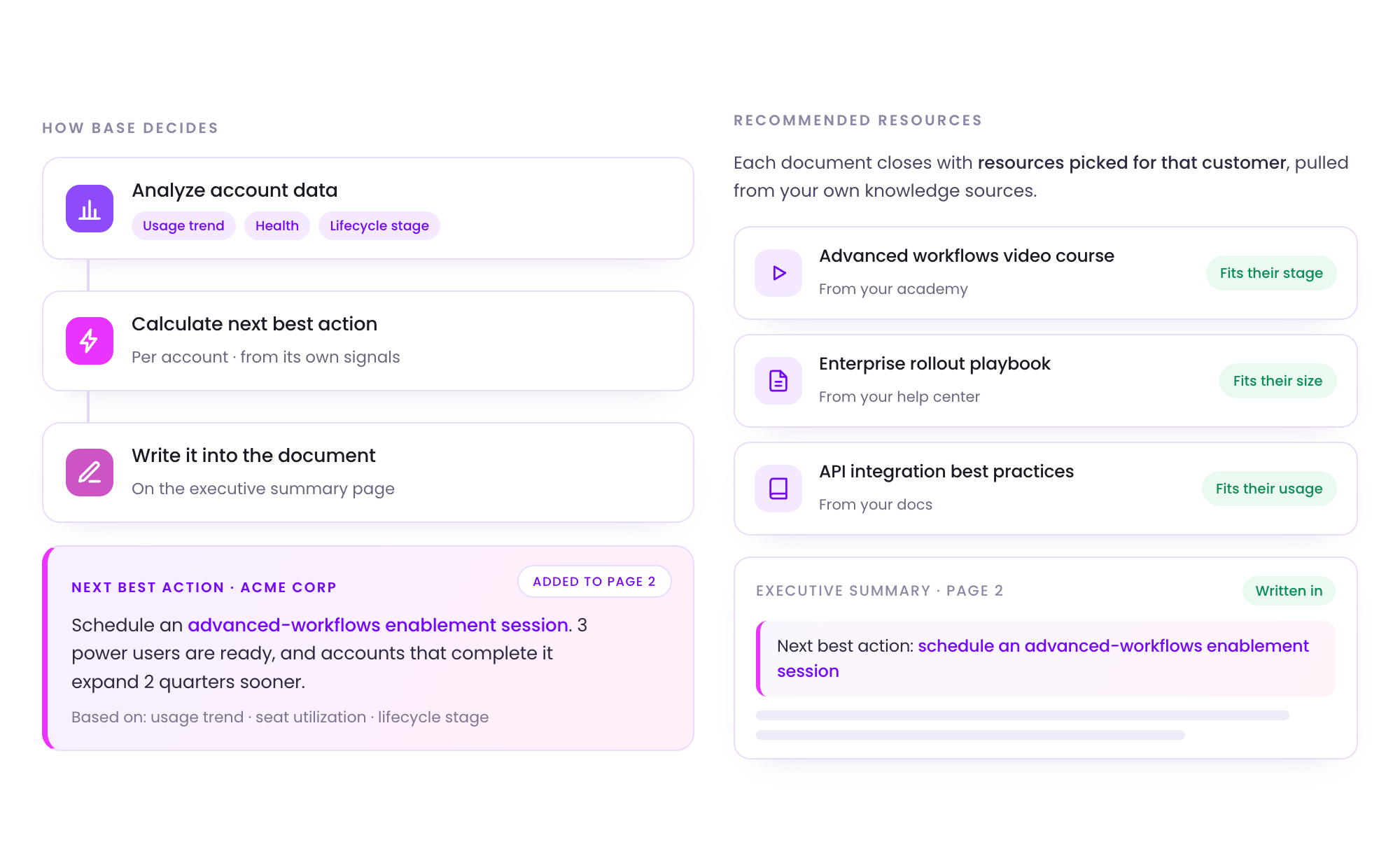
A journey step analyzes each account's usage, health and lifecycle, calculates the next best action, and writes it, with tailored recommendations, straight onto the page. Connect your knowledge sources and each document closes with resources picked for that customer.

⚡ Next best action · Acme Corp

Schedule an advanced-workflows enablement session. 3 power users are ready, and accounts that complete it expand 2 quarters sooner.

Based on: usage trend · seat utilization · lifecycle stage
Advanced workflows, video courseFrom your academy
Fits their stage
📄
Rollout playbook for large teamsFrom your help center
Fits their size
API integration best practicesFrom your docs
Fits their usage
What makes it different

Built for personalization at scale.

💬

Vibe-designed, data-bound pages

Every page is a conversation with Studio AI, and every number is a live {{token}} or object field, never typed in.

🔁

Journeys generate at scale

Segment-triggered runs: Enterprise · renewal in 90 days means a fresh personalized PDF per account, sent on, every cycle.

Criteria on every page

The expansion page only for Enterprise plans; the adoption deep-dive only when usage dipped. Personalization as policy.

👁

Preview as any account

See the exact resolved document: tokens, records, visibility, before anything ships. What you preview is what renders.

A product of its own

Buy Documents on its own.

A focused workspace: Documents, Studio, Accounts and Journeys, with guided self-service activation. Everything that isn't relevant to Documents is cleaned out of the way.

🧩

Fits the stack you have

Sits alongside your CRM, warehouse and CS tools. Nothing to replace, nothing to migrate.

🚀

Value in days

Guided activation: connect, describe, assemble, generate. First PDF in week one.

📈

Priced to land

Plan & usage you can see: PDFs per month, sources, seats. Start small, grow in.

Get set up · self-service

Connect a data source. Accounts appear automatically.

Create a document component. Described in plain language.

3

Assemble a document. Pages, data, criteria.

4

Generate & export. Personalized PDFs per account.

FAQ

Frequently asked questions

What is Base Documents?

A standalone product that generates polished, personalized documents from your live data: QBRs, EBRs, value snapshots and renewal docs. One master template renders with each customer's own data, with criteria applied, and the result is a point-in-time snapshot of the truth.

Which data sources does it connect to?

Salesforce, HubSpot, Snowflake, BigQuery, Redshift and Tableau. Access is scoped and read-only: you decide up front which objects and fields Documents can see, and data is never passed between customers.

Do I need to be a designer?

No. You describe the page and Studio AI designs it for you. Then you redesign by chat: layout, colors, charts, new elements. Every iteration is a version; publish the one you love and it becomes a building block for every document.

How does per-customer personalization work?

Every page carries its own visibility rules on account fields, so one customer might see a page another customer won't. Each customer's document keeps only the pages they match, and every number is a live token or object field fetched at generation time.

Can it run automatically?

Yes. Generate ad-hoc, in batches, or on a journey: on the first of the month, generate PDFs for a segment and send them by email, automatically, without you having to touch it. Update the template once and the next run follows the update.

Is it a standalone product?

Yes. Base Documents is bought on its own and fits the stack you already run. You get a focused workspace with exactly four areas: Documents, Studio, Accounts and Journeys, plus only the integrations relevant to Documents.

Never build a QBR by hand again.

See Base Documents on your own data. Connect a source, generate a document, and judge it on the spot.

Book a 30-minute demo
Standalone product · works with your existing stack